
English · .NET
Appearance
import LiteYouTube from '@site/src/components/LiteYouTube';
A locator from Locator.NormalizeAsync() now converts to a string as C# code. Use it with Page.GetByRef() to turn an element that an agent picks from a Page.AriaSnapshotAsync() in the "ai" mode into code for your test:
var normalized = await page.GetByRef("e2").NormalizeAsync();
Console.WriteLine(normalized.ToString());
// GetByRole(AriaRole.Button, new() { Name = "Submit" })
New option timeout in CdpSession.SendAsync().
New PlaywrightAssertionException is thrown when a Playwright assertion is not met. It extends PlaywrightException, so catch (PlaywrightException) blocks catch it as well.
New ActionTimeout and NavigationTimeout run settings set the default timeouts of every context that the NUnit, MSTest, xUnit and xUnit v3 base classes create. Set them in the .runsettings file or on the command line:
<RunSettings>
  <Playwright>
    <ActionTimeout>10000</ActionTimeout>
    <NavigationTimeout>60000</NavigationTimeout>
  </Playwright>
</RunSettings>dotnet test -- Playwright.ActionTimeout=10000 Playwright.NavigationTimeout=60000Locator.ClickAsync(), Locator.CheckAsync(), Locator.TapAsync(), Locator.FillAsync(), Locator.ClearAsync() and Locator.SelectOptionAsync() now wait for the element to be not inert. An action on an element with the inert attribute, or inside such an element, now times out if the element stays inert.BrowserContext.CookiesAsync() and ApiRequestContext.CookiesAsync() no longer return host-only cookies for subdomains or Path=/api cookies for /apiv2, and a Path=/foo/ cookie does not match /foo. APIRequestContext sends a cookie without a name as Cookie: x instead of Cookie: =x, and stores Set-Cookie: token as a cookie without a name.proxy option now answer only proxy challenges. To authenticate on a website, use httpCredentials.<details>, is no longer part of accessible names and aria snapshots. This can change the results of Page.GetByRole() with a name, Locator.AriaSnapshotAsync() and LocatorAssertions.ToMatchAriaSnapshotAsync().ParamsString option in APIRequestContext requests is now appended to the query that the URL already has, instead of replacing it.libatomic1 library.This version was also tested against the following stable channels:
New Page.Webmcp and Frame.Webmcp give access to the tools that a page registers through the experimental WebMCP browser API, so you can test them like any other part of your app:
var browser = await playwright.Chromium.LaunchAsync(new() { Args = new[] { "--enable-features=WebMCP" } });
var page = await browser.NewPageAsync();
await page.GotoAsync("https://example.com");

foreach (var tool in await page.Webmcp.ToolsAsync())
    Console.WriteLine($"{tool.Name}: {tool.Description}");

var result = await page.Webmcp.CallToolAsync("add", new { a = 2, b = 40 });
Console.WriteLine(result?.GetProperty("content")[0].GetProperty("text")); // "42"
Playwright MCP also supports WebMCP by default, with page-defined tools offered to the agent as webmcp_<tool>. Pass --no-webmcp to opt out.
playwright-cli exposes them as well:
playwright-cli webmcp-list
playwright-cli webmcp-call search_catalog --params '{"query":"cats"}'Videos can now be recorded at a custom frame rate, and the decorations for actions are styled with plain CSS:
await page.Screencast.StartAsync(new()
{
    Path = "video.webm",
    Size = new() { Width = 1920, Height = 1080 },
    Fps = 60,
});
await page.Screencast.ShowActionsAsync(new()
{
    Style = new()
    {
        Point = "width: 20px; height: 20px; border-radius: 50%; background: red",
        Highlight = "outline: 2px solid #333; background: rgba(0, 128, 255, .15)",
        Title = "font-size: 16px",
    },
});recordVideoFps option and new fps option in Screencast.StartAsync(). Firefox and WebKit currently capture up to 25 frames per second.style option takes CSS declarations for the point marker, the target highlight and the action title. It replaces the FontSize option, which is now deprecated.playwright-cli.New Locator.Within() combines two locators that you already have, reading in the natural order — "this button, within that dialog":
var saveButton = page.GetByRole(AriaRole.Button, new() { Name = "Save" });
var dialog = page.GetByTestId("settings-dialog");

await saveButton.Within(dialog).ClickAsync();
Relative locators such as Locator.Nth() or Locator.First() are resolved inside each parent separately, which makes column-like queries straightforward:
// The third cell of every row, not the third cell in the table.
var thirdColumn = page.GetByRole(AriaRole.Cell).Nth(2).Within(page.GetByRole(AriaRole.Row));
await Expect(thirdColumn).ToHaveTextAsync(new[] { "Apple", "Banana", "Cherry" });
New Page.GetByRef() locates an element by its aria ref, such as e2, reported by Page.AriaSnapshotAsync() in the "ai" mode.
New option includeShadow in Page.ContentAsync() and Frame.ContentAsync() serializes open shadow roots as declarative shadow DOM.
New option signCount sets the initial signature counter of a virtual credential. Credentials.CreateAsync() and Credentials.GetAsync() return the current SignCount, and it is saved and restored together with the credentials in the storage state.
New ApiRequestContext.AddCookiesAsync(), ApiRequestContext.CookiesAsync() and ApiRequestContext.ClearCookiesAsync() manage cookies of a request context, mirroring the BrowserContext methods:
await request.AddCookiesAsync(new[]
{
    new Cookie { Name = "session-id", Value = "42", Url = "https://example.com" },
});
Console.WriteLine(await request.CookiesAsync("https://example.com"));
await request.ClearCookiesAsync(new() { Name = "session-id" });visibility: hidden, are now considered hidden by actions, Locator.IsVisibleAsync() and LocatorAssertions.ToBeVisibleAsync().This version was also tested against the following stable channels:
Page.FrameLocator() and Frame.FrameLocator() called without a selector search in any frame of the subtree, so you no longer need to locate the iframe first:
// Finds the button in any frame on the page.
await page.FrameLocator().GetByRole(AriaRole.Button).ClickAsync();
The rest of the locator resolves inside a single frame, just like a regular locator, and an error is thrown when it matches elements in several frames.
New Locator.Visible() returns a locator that matches only visible elements. It is the recommended replacement for the :visible CSS pseudo-class:
await page.Locator("button").Visible.ClickAsync();New ariaSnapshots and screenSnapshots options of Tracing.StartAsync() capture an aria snapshot and a screenshot of the page on every action:
await context.Tracing.StartAsync(new()
{
  Snapshots = true,
  AriaSnapshots = true,
  ScreenSnapshots = true
});
With aria and screen snapshots recorded, the new Display Aria mode in the trace viewer shows the action screenshot side by side with the aria snapshot, and hovering an aria node highlights it on the screenshot.
httpCredentials now also accepts an array of credentials. The first entry matching the request origin is used, and entries without an origin match any request.opfs includes the origin private file system in the storage state, so it can be persisted and restored into later contexts.Page.DialogClosed and BrowserContext.DialogClosed are emitted when a JavaScript dialog is accepted, dismissed or closed by the user.pwsh bin/Debug/netX/playwright.ps1 install --no-remove keeps the browsers of other Playwright installations instead of removing them.pwsh bin/Debug/netX/playwright.ps1 codegen --http-credentials records against pages behind HTTP authentication.This version was also tested against the following stable channels:
Page.ScreenshotAsync() and Locator.ScreenshotAsync() can now capture screenshots in the WebP format — Playwright infers the format from a .webp file extension, or you can set the type explicitly. Quality 100 (the default) is lossless, while lower values use lossy compression:
await page.ScreenshotAsync(new() { Path = "homepage.webp", Quality = 50 });scroll option ("auto" | "none") on actions to opt out of Playwright's automatic scroll-into-view.Locator.WaitForFunctionAsync() waits until a function — called with the matching element — returns a truthy value.ApiResponse.Timing() returns resource timing information for an API response.navigator.clipboard no longer read or overwrite the clipboard of the machine running them.This version was also tested against the following stable channels:
New Credentials virtual authenticator, available via BrowserContext.Credentials, lets tests register passkeys and answer navigator.credentials.create() / navigator.credentials.get() ceremonies in the page — no real hardware key required, works in all browsers:
var context = await browser.NewContextAsync();

// Seed a passkey your backend provisioned for a test user.
await context.Credentials.CreateAsync("example.com", new()
{
    Id = credentialId,
    UserHandle = userHandle,
    PrivateKey = privateKey,
    PublicKey = publicKey,
});
await context.Credentials.InstallAsync();

var page = await context.NewPageAsync();
await page.GotoAsync("https://example.com/login");
// The page's navigator.credentials.get() is answered with the seeded passkey.
You can also let the app register a passkey once in a setup test, read it back with Credentials.GetAsync(), and seed it into later tests — see Credentials for details.
New WebStorage API, available via Page.LocalStorage and Page.SessionStorage, reads and writes the page's storage for the current origin:
await page.LocalStorage.SetItemAsync("token", "abc");
var token = await page.LocalStorage.GetItemAsync("token");
var items = await page.SessionStorage.ItemsAsync();ApiResponse.SecurityDetailsAsync() and ApiResponse.ServerAddrAsync() mirror the browser-side Response.SecurityDetailsAsync() and Response.ServerAddrAsync().ArtifactsDir in BrowserType.ConnectOverCDPAsync() controls where artifacts such as traces and downloads are stored when attached to an existing browser.Cursor in Screencast.ShowActionsAsync() controls the cursor decoration rendered for pointer actions.OnFrame callback in Screencast.StartAsync() now receives a Timestamp of when the frame was presented by the browser.This version was also tested against the following stable channels:
Tracing.StartHarAsync() / Tracing.StopHarAsync() expose HAR recording as a first-class tracing API, with the same Content, Mode and UrlFilter options as RecordHar:
await context.Tracing.StartHarAsync("trace.har");
var page = await context.NewPageAsync();
await page.GotoAsync("https://playwright.dev");
await context.Tracing.StopHarAsync();New Locator.DropAsync() simulates an external drag-and-drop of files or clipboard-like data onto an element. Playwright dispatches dragenter, dragover, and drop with a synthetic [DataTransfer] in the page context — works cross-browser and is great for testing upload zones:
await page.Locator("#dropzone").DropAsync(new() {
    Files = new FilePayload() {
        Name = "note.txt",
        MimeType = "text/plain",
        Buffer = Encoding.UTF8.GetBytes("hello"),
    },
});

await page.Locator("#dropzone").DropAsync(new() {
    Data = new Dictionary<string, string> {
        ["text/plain"] = "hello world",
        ["text/uri-list"] = "https://example.com",
    },
});PageAssertions.ToMatchAriaSnapshotAsync() now works on a Page, in addition to a Locator — equivalent to asserting against Page.Locator("body").Boxes option on Locator.AriaSnapshotAsync() / Page.AriaSnapshotAsync() appends each element's bounding box as [box=x,y,width,height], useful for AI consumption.Browser.Context — fired when a new context is created on the browser.BrowserContext.Download, BrowserContext.FrameAttached, BrowserContext.FrameDetached, BrowserContext.FrameNavigated, BrowserContext.PageClose, BrowserContext.PageLoad.Description in Page.GetByRole() / Locator.GetByRole() / Frame.GetByRole() / FrameLocator.GetByRole() for matching the accessible description.Pseudo in LocatorAssertions.ToHaveCSSAsync() reads computed styles from ::before or ::after.Style in Locator.HighlightAsync() applies extra inline CSS to the highlight overlay, plus new Page.HideHighlightAsync() to clear all highlights.WebSocketRoute.Protocols() returns the WebSocket subprotocols requested by the page.NoDefaults in BrowserType.ConnectOverCDPAsync() disables Playwright's default overrides on the default context (download behavior, focus emulation, media emulation), so attaching to a user's daily-driver browser doesn't disturb its state.WebError.Location() mirrors ConsoleMessage.Location().Handle option on BrowserContext.ExposeBindingAsync and Page.ExposeBindingAsync.This version was also tested against the following stable channels:
New Page.Screencast API provides a unified interface for capturing page content with:
Screencast recording — record video with precise start/stop control, as an alternative to the recordVideoDir option:
await page.Screencast.StartAsync(new() { Path = "video.webm" });
// ... perform actions ...
await page.Screencast.StopAsync();
Action annotations — enable built-in visual annotations that highlight interacted elements and display action titles during recording:
await page.Screencast.ShowActionsAsync(new() { Position = "top-right" });ShowActionsAsync accepts Position ("top-left", "top", "top-right", "bottom-left", "bottom", "bottom-right"), Duration (ms per annotation), and FontSize (px). Returns a disposable to stop showing actions.
Visual overlays — add chapter titles and custom HTML overlays on top of the page for richer narration:
await page.Screencast.ShowChapterAsync("Adding TODOs", new() {
    Description = "Type and press enter for each TODO",
    Duration = 1000,
});

await page.Screencast.ShowOverlayAsync("<div style=\"color: red\">Recording</div>");
Real-time frame capture — stream JPEG-encoded frames for custom processing like thumbnails, live previews, AI vision, and more:
await page.Screencast.StartAsync(new() {
    OnFrame = frame => SendToVisionModel(frame.Data),
});
Agentic video receipts — coding agents can produce video evidence of their work. After completing a task, an agent can record a walkthrough video with rich annotations for human review:
await page.Screencast.StartAsync(new() { Path = "receipt.webm" });
await page.Screencast.ShowActionsAsync(new() { Position = "top-right" });

await page.Screencast.ShowChapterAsync("Verifying checkout flow", new() {
    Description = "Added coupon code support per ticket #1234",
});

// Agent performs the verification steps...
await page.Locator("#coupon").FillAsync("SAVE20");
await page.Locator("#apply-coupon").ClickAsync();
await Expect(page.Locator(".discount")).ToContainTextAsync("20%");

await page.Screencast.ShowChapterAsync("Done", new() {
    Description = "Coupon applied, discount reflected in total",
});

await page.Screencast.StopAsync();
The resulting video serves as a receipt: chapter titles provide context, action annotations highlight each interaction, and the visual walkthrough is faster to review than text logs.
Page.AriaSnapshotAsync() to capture the aria snapshot of the page — equivalent to Page.Locator("body").AriaSnapshotAsync().Depth and Mode in Locator.AriaSnapshotAsync().Locator.NormalizeAsync() converts a locator to follow best practices like test ids and aria roles.Page.PickLocatorAsync() enters an interactive mode where hovering over elements highlights them and shows the corresponding locator. Click an element to get its Locator back. Use Page.CancelPickLocatorAsync() to cancel.Page.Screencast provides video recording, real-time frame streaming, and overlay management.Screencast.StartAsync() and Screencast.StopAsync() for recording and frame capture.Screencast.ShowActionsAsync() and Screencast.HideActionsAsync() for action annotations.Screencast.ShowChapterAsync() and Screencast.ShowOverlayAsync() for visual overlays.Screencast.ShowOverlaysAsync() and Screencast.HideOverlaysAsync() for overlay visibility control.BrowserContext.SetStorageStateAsync() clears existing cookies, local storage, and IndexedDB for all origins and sets a new storage state — no need to create a new context.Page.ClearConsoleMessagesAsync() and Page.ClearPageErrorsAsync() to clear stored messages and errors.Filter in Page.ConsoleMessagesAsync() and Page.PageErrorsAsync() controls which messages are returned.ConsoleMessage.Timestamp().BrowserContext.Debugger provides programmatic control over the Playwright debugger.BrowserContext.IsClosed().Request.ExistingResponse() returns the response without waiting.Response.HttpVersionAsync() returns the HTTP version used by the response.Live in Tracing.StartAsync() for real-time trace updates.ArtifactsDir in BrowserType.LaunchAsync() to configure the artifacts directory.New Browser.BindAsync() API makes a launched browser available for playwright-cli, @playwright/mcp, and other clients to connect to.
Bind a browser — start a browser and bind it so others can connect:
var serverInfo = await browser.BindAsync("my-session", new() {
    WorkspaceDir = "/my/project",
});
Connect from playwright-cli — connect to the running browser from your favorite coding agent.
playwright-cli attach my-session
playwright-cli -s my-session snapshot
Connect from @playwright/mcp — or point your MCP server to the running browser.
@playwright/mcp --endpoint=my-sessionConnect from a Playwright client — use API to connect to the browser. Multiple clients at a time are supported!
var browser = await chromium.ConnectAsync(serverInfo.Endpoint);Pass Host and Port options to bind over WebSocket instead of a named pipe:
var serverInfo = await browser.BindAsync("my-session", new() {
    Host = "localhost",
    Port = 0,
});
// serverInfo.Endpoint is a ws:// URL
Call Browser.UnbindAsync() to stop accepting new connections.
Run playwright-cli show to open the Dashboard that lists all the bound browsers, their statuses, and allows interacting with them:
This version was also tested against the following stable channels:
Thanks to @cpAdm for contributing these improvements!
BrowserType.ConnectOverCDPAsync() now accepts an IsLocal option. When set to true, it tells Playwright that it runs on the same host as the CDP server, enabling file system optimizations.
_react and _vue selectors. See locators guide for alternatives.:light selector engine suffix. Use standard CSS selectors instead.Devtools from BrowserType.LaunchAsync() has been removed. Use Args = new[] { "--auto-open-devtools-for-tabs" } instead.This version was also tested against the following stable channels:
Playwright now runs on Chrome for Testing builds rather than Chromium. Headed mode uses chrome; headless mode uses chrome-headless-shell. Existing tests should continue to pass after upgrading to v1.57.
We're expecting no functional changes to come from this switch. The biggest change is the new icon and title in your toolbar.
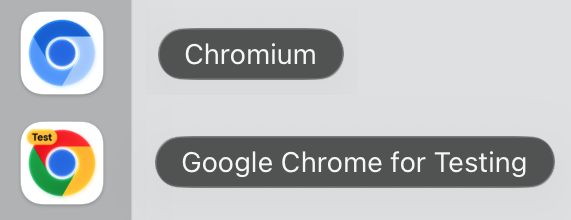
If you still see an unexpected behaviour change, please file an issue.
On Arm64 Linux, Playwright continues to use Chromium.
After 3 years of being deprecated, we removed Page.Accessibility from our API. Please use other libraries such as Axe if you need to test page accessibility. See our Node.js guide for integration with Axe.
Worker.Console event is emitted when JavaScript within the worker calls one of console API methods, e.g. console.log or console.dir.Locator.Description() returns locator description previously set with Locator.Describe().steps in Locator.ClickAsync() and Locator.DragToAsync() that configures the number of mousemove events emitted while moving the mouse pointer to the target element.Page.ConsoleMessagesAsync() and Page.PageErrorsAsync() for retrieving the most recent console messages from the pagePage.RequestsAsync() for retrieving the most recent network requests from the pageBrowserContext.BackgroundPage has been deprecated and will not be emitted. Method BrowserContext.BackgroundPages() will return an empty listinput placeholderToBeVisibleAsync() assertions: Codegen can now generate automatic ToBeVisibleAsync() assertions for common UI interactions. This feature can be enabled in the Codegen settings UI.Microsoft.Playwright.Xunit.v3Microsoft.Playwright.MSTest.v4This version was also tested against the following stable channels:
New cookie property PartitionKey in BrowserContext.CookiesAsync() and BrowserContext.AddCookiesAsync(). This property allows to save and restore partitioned cookies. See CHIPS MDN article for more information. Note that browsers have different support and defaults for cookie partitioning.
New option --user-data-dir in multiple commands. You can specify the same user data dir to reuse browsing state, like authentication, between sessions.
pwsh bin/Debug/netX/playwright.ps1 codegen --user-data-dir=./user-datapwsh bin/Debug/netX/playwright.ps1 open does not open the test recorder anymore. Use pwsh bin/Debug/netX/playwright.ps1 codegen instead.
This version was also tested against the following stable channels:
New Steps in Trace Viewer:
New method Locator.Describe() to describe a locator. Used for trace viewer.
var button = Page.GetByTestId("btn-sub").Describe("Subscribe button");
await button.ClickAsync();
pwsh bin/Debug/netX/playwright.ps1 install --list will now list all installed browsers, versions and locations.
This version was also tested against the following stable channels:
New method LocatorAssertions.ToContainClassAsync() to ergonomically assert individual class names on the element.
await Expect(Page.GetByRole(AriaRole.Listitem, new() { Name = "Ship v1.52" })).ToContainClassAsync("done");Aria Snapshots got two new properties: /children for strict matching and /url for links.
await Expect(locator).ToMatchAriaSnapshotAsync(@"
  - list
    - /children: equal
    - listitem: Feature A
    - listitem:
      - link ""Feature B"":
        - /url: ""https://playwright.dev""
");maxRedirects in ApiRequest.NewContextAsync() to control the maximum number of redirects.Page.RouteAsync() do not support ? and [] anymore. We recommend using regular expressions instead.Route.ContinueAsync() does not allow to override the Cookie header anymore. If a Cookie header is provided, it will be ignored, and the cookie will be loaded from the browser's cookie store. To set custom cookies, use BrowserContext.AddCookiesAsync().This version was also tested against the following stable channels:
New option indexedDB for BrowserContext.StorageStateAsync() allows to save and restore IndexedDB contents. Useful when your application uses IndexedDB API to store authentication tokens, like Firebase Authentication.
Here is an example following the authentication guide:
// Save storage state into the file. Make sure to include IndexedDB.
await context.StorageStateAsync(new()
{
    Path = "../../../playwright/.auth/state.json",
    IndexedDB = true
});

// Create a new context with the saved storage state.
var context = await browser.NewContextAsync(new()
{
    StorageStatePath = "../../../playwright/.auth/state.json"
});
New option visible for Locator.Filter() allows matching only visible elements.
// Ignore invisible todo items.
var todoItems = Page.GetByTestId("todo-item").Filter(new() { Visible = true });
// Check there are exactly 3 visible ones.
await Expect(todoItems).ToHaveCountAsync(3);
New option Contrast for methods Page.EmulateMediaAsync() and Browser.NewContextAsync() allows to emulate the prefers-contrast media feature.
New option failOnStatusCode makes all fetch requests made through the APIRequestContext throw on response codes other than 2xx and 3xx.
This version was also tested against the following stable channels:
LocatorAssertions.ToHaveAccessibleErrorMessageAsync() to assert the Locator points to an element with a given aria errormessage.canvas content in traces is error-prone. Display is now disabled by default, and can be enabled via the Display canvas content UI setting.Call and Network panels now display additional time information.LocatorAssertions.ToBeEditableAsync() and Locator.IsEditableAsync() now throw if the target element is not <input>, <select>, or a number of other editable elements.This version was also tested against the following stable channels:
New assertion LocatorAssertions.ToMatchAriaSnapshotAsync() verifies page structure by comparing to an expected accessibility tree, represented as YAML.
await page.GotoAsync("https://playwright.dev");
await Expect(page.Locator("body")).ToMatchAriaSnapshotAsync(@"
  - banner:
    - heading /Playwright enables reliable/ [level=1]
    - link ""Get started""
    - link ""Star microsoft/playwright on GitHub""
  - main:
    - img ""Browsers (Chromium, Firefox, WebKit)""
    - heading ""Any browser • Any platform • One API""
");
You can generate this assertion with Test Generator or by calling Locator.AriaSnapshotAsync().
Learn more in the aria snapshots guide.
New method Tracing.GroupAsync() allows you to visually group actions in the trace viewer.
// All actions between GroupAsync and GroupEndAsync
// will be shown in the trace viewer as a group.
await Page.Context.Tracing.GroupAsync("Open Playwright.dev > API");
await Page.GotoAsync("https://playwright.dev/");
await Page.GetByRole(AriaRole.Link, new() { Name = "API" }).ClickAsync();
await Page.Context.Tracing.GroupEndAsync();chrome and msedge channels switch to new headless mode This change affects you if you're using one of the following channels in your playwright.config.ts:
chrome, chrome-dev, chrome-beta, or chrome-canarymsedge, msedge-dev, msedge-beta, or msedge-canaryAfter updating to Playwright v1.49, run your test suite. If it still passes, you're good to go. If not, you will probably need to update your snapshots, and adapt some of your test code around PDF viewers and extensions. See issue #33566 for more details.
You can opt into the new headless mode by using 'chromium' channel. As official Chrome documentation puts it:
New Headless on the other hand is the real Chrome browser, and is thus more authentic, reliable, and offers more features. This makes it more suitable for high-accuracy end-to-end web app testing or browser extension testing.
See issue #33566 for the list of possible breakages you could encounter and more details on Chromium headless. Please file an issue if you see any problems after opting in.
<?xml version="1.0" encoding="utf-8"?>
<RunSettings>
  <Playwright>
    <BrowserName>chromium</BrowserName>
    <LaunchOptions>
      <Channel>chromium</Channel>
    </LaunchOptions>
  </Playwright>
</RunSettings>dotnet test -- Playwright.BrowserName=chromium Playwright.LaunchOptions.Channel=chromium<canvas> elements inside a snapshot now draw a preview.This version was also tested against the following stable channels:
New methods Page.RouteWebSocketAsync() and BrowserContext.RouteWebSocketAsync() allow to intercept, modify and mock WebSocket connections initiated in the page. Below is a simple example that mocks WebSocket communication by responding to a "request" with a "response".
await page.RouteWebSocketAsync("/ws", ws => {
  ws.OnMessage(frame => {
    if (frame.Text == "request")
      ws.Send("response");
  });
});
See WebSocketRoute for more details.
Route.FulfillAsync() are not shown in the report and trace viewer anymore. You can see which network requests were routed in the network tab instead.Page.RequestGCAsync() may help detect memory leaks.This version was also tested against the following stable channels:
The Network tab in the trace viewer has several nice improvements:
mcr.microsoft.com/playwright/dotnet:v1.47.0 now serves a Playwright image based on Ubuntu 24.04 Noble. To use the 22.04 jammy-based image, please use mcr.microsoft.com/playwright/dotnet:v1.47.0-jammy instead.:latest/:focal/:jammy tag for Playwright Docker images is no longer being published. Pin to a specific version for better stability and reproducibility.clientCertificates.cert and clientCertificates.key as byte arrays instead of file paths.noWaitAfter in Locator.SelectOptionAsync() was deprecated.macos-13. We recommend upgrading GitHub Actions to macos-14.This version was also tested against the following stable channels:
Playwright now allows to supply client-side certificates, so that server can verify them, as specified by TLS Client Authentication.
You can provide client certificates as a parameter of Browser.NewContextAsync() and ApiRequest.NewContextAsync(). The following snippet sets up a client certificate for https://example.com:
var context = await Browser.NewContextAsync(new() {
  ClientCertificates = [
    new() {
      Origin = "https://example.com",
      CertPath = "client-certificates/cert.pem",
      KeyPath = "client-certificates/key.pem",
    }
  ]
});Route.ContinueAsync().BaseURL.maxRetries option in ApiRequestContext.FetchAsync() which retries on the ECONNRESET network error.This version was also tested against the following stable channels:
Utilizing the new Clock API allows to manipulate and control time within tests to verify time-related behavior. This API covers many common scenarios, including:
// Initialize clock with some time before the test time and let the page load naturally.
// `Date.now` will progress as the timers fire.
await Page.Clock.InstallAsync(new()
{
  TimeDate = new DateTime(2024, 2, 2, 8, 0, 0)
});
await Page.GotoAsync("http://localhost:3333");

// Pretend that the user closed the laptop lid and opened it again at 10am.
// Pause the time once reached that point.
await Page.Clock.PauseAtAsync(new DateTime(2024, 2, 2, 10, 0, 0));

// Assert the page state.
await Expect(Page.GetByTestId("current-time")).ToHaveTextAsync("2/2/2024, 10:00:00 AM");

// Close the laptop lid again and open it at 10:30am.
await Page.Clock.FastForwardAsync("30:00");
await Expect(Page.GetByTestId("current-time")).ToHaveTextAsync("2/2/2024, 10:30:00 AM");
See the clock guide for more details.
Method Locator.SetInputFilesAsync() now supports uploading a directory for <input type=file webkitdirectory> elements.
await page.GetByLabel("Upload directory").SetInputFilesAsync("mydir");Multiple methods like Locator.ClickAsync() or Locator.PressAsync() now support a ControlOrMeta modifier key. This key maps to Meta on macOS and maps to Control on Windows and Linux.
// Press the common keyboard shortcut Control+S or Meta+S to trigger a "Save" operation.
await page.Keyboard.PressAsync("ControlOrMeta+S");
New property httpCredentials.send in ApiRequest.NewContextAsync() that allows to either always send the Authorization header or only send it in response to 401 Unauthorized.
Playwright now supports Chromium, Firefox and WebKit on Ubuntu 24.04.
v1.45 is the last release to receive WebKit update for macOS 12 Monterey. Please update macOS to keep using the latest WebKit.
This version was also tested against the following stable channels:
Accessibility assertions
LocatorAssertions.ToHaveAccessibleNameAsync() checks if the element has the specified accessible name:
var locator = Page.GetByRole(AriaRole.Button);
await Expect(locator).ToHaveAccessibleNameAsync("Submit");
LocatorAssertions.ToHaveAccessibleDescriptionAsync() checks if the element has the specified accessible description:
var locator = Page.GetByRole(AriaRole.Button);
await Expect(locator).ToHaveAccessibleDescriptionAsync("Upload a photo");
LocatorAssertions.ToHaveRoleAsync() checks if the element has the specified ARIA role:
var locator = Page.GetByTestId("save-button");
await Expect(locator).ToHaveRoleAsync(AriaRole.Button);
Locator handler
Page.AddLocatorHandlerAsync(), Playwright will now wait until the overlay that triggered the handler is not visible anymore. You can opt-out of this behavior with the new NoWaitAfter option.Times option in Page.AddLocatorHandlerAsync() to specify maximum number of times the handler should be run.Page.AddLocatorHandlerAsync() now accepts the locator as argument.Page.RemoveLocatorHandlerAsync() method for removing previously added locator handlers.var locator = Page.GetByText("This interstitial covers the button");
await Page.AddLocatorHandlerAsync(locator, async (overlay) =>
{
await overlay.Locator("#close").ClickAsync();
}, new() { Times = 3, NoWaitAfter = true });
// Run your tests that can be interrupted by the overlay.
// ...
await Page.RemoveLocatorHandlerAsync(locator);Miscellaneous options
New method FormData.Append() allows to specify repeating fields with the same name in Multipart option in APIRequestContext.FetchAsync():
var formData = Context.APIRequest.CreateFormData();
formData.Append("file", new FilePayload()
{
    Name = "f1.js",
    MimeType = "text/javascript",
    Buffer = System.Text.Encoding.UTF8.GetBytes("var x = 2024;")
});
formData.Append("file", new FilePayload()
{
    Name = "f2.txt",
    MimeType = "text/plain",
    Buffer = System.Text.Encoding.UTF8.GetBytes("hello")
});
var response = await Context.APIRequest.PostAsync("https://example.com/uploadFiles", new() { Multipart = formData });
PageAssertions.ToHaveURLAsync() now supports IgnoreCase option.
This version was also tested against the following stable channels:
Method BrowserContext.ClearCookiesAsync() now supports filters to remove only some cookies.
// Clear all cookies.
await Context.ClearCookiesAsync();
// New: clear cookies with a particular name.
await Context.ClearCookiesAsync(new() { Name = "session-id" });
// New: clear cookies for a particular domain.
await Context.ClearCookiesAsync(new() { Domain = "my-origin.com" });
New property Locator.ContentFrame() converts a Locator object to a FrameLocator. This can be useful when you have a Locator object obtained somewhere, and later on would like to interact with the content inside the frame.
var locator = Page.Locator("iframe[name='embedded']");
// ...
var frameLocator = locator.ContentFrame;
await frameLocator.GetByRole(AriaRole.Button).ClickAsync();
New property FrameLocator.Owner() converts a FrameLocator object to a Locator. This can be useful when you have a FrameLocator object obtained somewhere, and later on would like to interact with the iframe element.
var frameLocator = page.FrameLocator("iframe[name='embedded']");
// ...
var locator = frameLocator.Owner;
await Expect(locator).ToBeVisibleAsync();This version was also tested against the following stable channels:
New method Page.AddLocatorHandlerAsync() registers a callback that will be invoked when specified element becomes visible and may block Playwright actions. The callback can get rid of the overlay. Here is an example that closes a cookie dialog when it appears.
// Setup the handler.
await Page.AddLocatorHandlerAsync(
    Page.GetByRole(AriaRole.Heading, new() { Name = "Hej! You are in control of your cookies." }),
    async () =>
    {
        await Page.GetByRole(AriaRole.Button, new() { Name = "Accept all" }).ClickAsync();
    });
// Write the test as usual.
await Page.GotoAsync("https://www.ikea.com/");
await Page.GetByRole(AriaRole.Link, new() { Name = "Collection of blue and white" }).ClickAsync();
await Expect(Page.GetByRole(AriaRole.Heading, new() { Name = "Light and easy" })).ToBeVisibleAsync();Page.PdfAsync() accepts two new options tagged and outline.This version was also tested against the following stable channels:
Page.UnrouteAllAsync() removes all routes registered by Page.RouteAsync() and Page.RouteFromHARAsync(). Optionally allows to wait for ongoing routes to finish, or ignore any errors from them.BrowserContext.UnrouteAllAsync() removes all routes registered by BrowserContext.RouteAsync() and BrowserContext.RouteFromHARAsync(). Optionally allows to wait for ongoing routes to finish, or ignore any errors from them.style in Page.ScreenshotAsync() and style in Locator.ScreenshotAsync() to add custom CSS to the page before taking a screenshot.This version was also tested against the following stable channels:
New tools to generate assertions:
LocatorAssertions.ToBeVisibleAsync().LocatorAssertions.ToHaveValueAsync().LocatorAssertions.ToContainTextAsync().Here is an example of a generated test with assertions:
await Page.GotoAsync("https://playwright.dev/");
await Page.GetByRole(AriaRole.Link, new() { Name = "Get started" }).ClickAsync();
await Expect(Page.GetByLabel("Breadcrumbs").GetByRole(AriaRole.List)).ToContainTextAsync("Installation");
await Expect(Page.GetByLabel("Search")).ToBeVisibleAsync();
await Page.GetByLabel("Search").ClickAsync();
await Page.GetByPlaceholder("Search docs").FillAsync("locator");
await Expect(Page.GetByPlaceholder("Search docs")).ToHaveValueAsync("locator");reason in Page.CloseAsync(), reason in BrowserContext.CloseAsync() and reason in Browser.CloseAsync(). Close reason is reported for all operations interrupted by the closure.firefoxUserPrefs in BrowserType.LaunchPersistentContextAsync().Download.PathAsync() and Download.CreateReadStreamAsync() throw an error for failed and cancelled downloads.This version was also tested against the following stable channels:
Evergreen browsers update.
This version was also tested against the following stable channels:
Page.TypeAsync(), Frame.TypeAsync(), Locator.TypeAsync() and ElementHandle.TypeAsync(). Please use Locator.FillAsync() instead which is much faster. Use Locator.PressSequentiallyAsync() only if there is a special keyboard handling on the page, and you need to press keys one-by-one.This version was also tested against the following stable channels:
Playwright now supports Debian 12 Bookworm on both x86_64 and arm64 for Chromium, Firefox and WebKit. Let us know if you encounter any issues!
Linux support looks like this:
| Ubuntu 20.04 | Ubuntu 22.04 | Debian 11 | Debian 12 | |
|---|---|---|---|---|
| Chromium | ✅ | ✅ | ✅ | ✅ |
| WebKit | ✅ | ✅ | ✅ | ✅ |
| Firefox | ✅ | ✅ | ✅ | ✅ |
This version was also tested against the following stable channels:
🏝️ Summer maintenance release.
This version was also tested against the following stable channels:
New option MaskColor for methods Page.ScreenshotAsync() and Locator.ScreenshotAsync() to change default masking color.
New uninstall CLI command to uninstall browser binaries:
$ pwsh bin/Debug/netX/playwright.ps1 uninstall # remove browsers installed by this installation
$ pwsh bin/Debug/netX/playwright.ps1 uninstall --all # remove all ever-install Playwright browsersThis version was also tested against the following stable channels:
New Locator.And() to create a locator that matches both locators.
var button = page.GetByRole(AriaRole.BUTTON).And(page.GetByTitle("Subscribe"));New events BrowserContext.Console and BrowserContext.Dialog to subscribe to any dialogs and console messages from any page from the given browser context. Use the new methods ConsoleMessage.Page() and Dialog.Page() to pin-point event source.
This version was also tested against the following stable channels:
Use Locator.Or() to create a locator that matches either of the two locators. Consider a scenario where you'd like to click on a "New email" button, but sometimes a security settings dialog shows up instead. In this case, you can wait for either a "New email" button, or a dialog and act accordingly:
var newEmail = Page.GetByRole(AriaRole.Button, new() { Name = "New email" });
var dialog = Page.GetByText("Confirm security settings");
await Expect(newEmail.Or(dialog)).ToBeVisibleAsync();
if (await dialog.IsVisibleAsync())
  await Page.GetByRole(AriaRole.Button, new() { Name = "Dismiss" }).ClickAsync();
await newEmail.ClickAsync();
Use new options hasNot and hasNotText in Locator.Filter() to find elements that do not match certain conditions.
var rowLocator = Page.Locator("tr");
await rowLocator
    .Filter(new() { HasNotText = "text in column 1" })
    .Filter(new() { HasNot = Page.GetByRole(AriaRole.Button, new() { Name = "column 2 button" })})
    .ScreenshotAsync();
Use new web-first assertion LocatorAssertions.ToBeAttachedAsync() to ensure that the element is present in the page's DOM. Do not confuse with the LocatorAssertions.ToBeVisibleAsync() that ensures that element is both attached & visible.
Locator.Or()hasNot in Locator.Filter()hasNotText in Locator.Filter()LocatorAssertions.ToBeAttachedAsync()timeout in Route.FetchAsync()mcr.microsoft.com/playwright/dotnet:v1.33.0 now serves a Playwright image based on Ubuntu Jammy. To use the focal-based image, please use mcr.microsoft.com/playwright/dotnet:v1.33.0-focal instead.This version was also tested against the following stable channels:
updateMode and updateContent in Page.RouteFromHARAsync() and BrowserContext.RouteFromHARAsync().name in method Tracing.StartChunkAsync().This version was also tested against the following stable channels:
New assertion LocatorAssertions.ToBeInViewportAsync() ensures that locator points to an element that intersects viewport, according to the intersection observer API.
var locator = Page.GetByRole(AriaRole.Button);

// Make sure at least some part of element intersects viewport.
await Expect(locator).ToBeInViewportAsync();

// Make sure element is fully outside of viewport.
await Expect(locator).Not.ToBeInViewportAsync();

// Make sure that at least half of the element intersects viewport.
await Expect(locator).ToBeInViewportAsync(new() { Ratio = 0.5 });
New methods BrowserContext.NewCDPSessionAsync() and Browser.NewBrowserCDPSessionAsync() create a Chrome DevTools Protocol session for the page and browser respectively.
maxRedirects for method Route.FetchAsync().This version was also tested against the following stable channels:
This version was also tested against the following stable channels:
New method Route.FetchAsync() and new option Json for Route.FulfillAsync():
await Page.RouteAsync("**/api/settings", async route => {
  // Fetch original settings.
  var response = await route.FetchAsync();

  // Force settings theme to a predefined value.
  var json = await response.JsonAsync<MyDataType>();
  json.Theme = "Solarized";

  // Fulfill with modified data.
  await route.FulfillAsync(new() {
    Json = json
  });
});
New method Locator.AllAsync() to iterate over all matching elements:
// Check all checkboxes!
var checkboxes = Page.GetByRole(AriaRole.Checkbox);
foreach (var checkbox in await checkboxes.AllAsync())
  await checkbox.CheckAsync();
Locator.SelectOptionAsync() matches now by value or label:
<select multiple>
  <option value="red">Red</option>
  <option value="green">Green</option>
  <option value="blue">Blue</option>
</select>await element.SelectOptionAsync("Red");This version was also tested against the following stable channels:

This version was also tested against the following stable channels:
With these new APIs writing locators is a joy:
Page.GetByText() to locate by text content.Page.GetByRole() to locate by ARIA role, ARIA attributes and accessible name.Page.GetByLabel() to locate a form control by associated label's text.Page.GetByTestId() to locate an element based on its data-testid attribute (other attribute can be configured).Page.GetByPlaceholder() to locate an input by placeholder.Page.GetByAltText() to locate an element, usually image, by its text alternative.Page.GetByTitle() to locate an element by its title.await page.GetByLabel("User Name").FillAsync("John");
await page.GetByLabel("Password").FillAsync("secret-password");
await page.GetByRole(AriaRole.Button, new() { NameString = "Sign in" }).ClickAsync();
await Expect(Page.GetByText("Welcome, John!")).ToBeVisibleAsync();All the same methods are also available on Locator, FrameLocator and Frame classes.
LocatorAssertions.ToHaveAttributeAsync() with an empty value does not match missing attribute anymore. For example, the following snippet will succeed when button does not have a disabled attribute.
await Expect(Page.GetByRole(AriaRole.Button)).ToHaveAttributeAsync("disabled", "");This version was also tested against the following stable channels:
Enabled for LocatorAssertions.ToBeEnabledAsync().LocatorAssertions.ToHaveTextAsync() now pierces open shadow roots.Editable for LocatorAssertions.ToBeEditableAsync().Visible for LocatorAssertions.ToBeVisibleAsync().ApiResponseAssertions.ToBeOKAsync() is now available.MaxRedirects for ApiRequestContext.GetAsync() and others to limit redirect count.A bunch of Playwright APIs already support the WaitUntil: WaitUntilState.DOMContentLoaded option. For example:
await Page.GotoAsync("https://playwright.dev", new() { WaitUntil = WaitUntilState.DOMContentLoaded });Prior to 1.26, this would wait for all iframes to fire the DOMContentLoaded event.
To align with web specification, the WaitUntilState.DOMContentLoaded value only waits for the target frame to fire the 'DOMContentLoaded' event. Use WaitUntil: WaitUntilState.Load to wait for all iframes.
This version was also tested against the following stable channels:
Microsoft.Playwright.NUnit and Microsoft.Playwright.MSTest will now consider the .runsettings file and passed settings via the CLI when running end-to-end tests. See in the documentation for a full list of supported settings.
The following does now work:
<?xml version="1.0" encoding="utf-8"?>
<RunSettings>
  <!-- Playwright -->
  <Playwright>
    <BrowserName>chromium</BrowserName>
    <ExpectTimeout>5000</ExpectTimeout>
    <LaunchOptions>
      <Headless>true</Headless>
      <Channel>msedge</Channel>
    </LaunchOptions>
  </Playwright>
  <!-- General run configuration -->
  <RunConfiguration>
    <EnvironmentVariables>
      <!-- For debugging selectors, it's recommend to set the following environment variable -->
      <DEBUG>pw:api</DEBUG>
    </EnvironmentVariables>
  </RunConfiguration>
</RunSettings>This version was also tested against the following stable channels:
Playwright now supports Debian 11 Bullseye on x86_64 for Chromium, Firefox and WebKit. Let us know if you encounter any issues!
Linux support looks like this:
| | Ubuntu 20.04 | Ubuntu 22.04 | Debian 11 | :--- | :---: | :---: | :---: | :---: | | Chromium | ✅ | ✅ | ✅ | | WebKit | ✅ | ✅ | ✅ | | Firefox | ✅ | ✅ | ✅ |
We rewrote our Getting Started docs to be more end-to-end testing focused. Check them out on playwright.dev.
Playwright for .NET 1.23 introduces new API Testing that lets you send requests to the server directly from .NET! Now you can:
To do a request on behalf of Playwright's Page, use new Page.APIRequest API:
// Do a GET request on behalf of page
var response = await Page.APIRequest.GetAsync("http://example.com/foo.json");
Console.WriteLine(response.Status);
Console.WriteLine(response.StatusText);
Console.WriteLine(response.Ok);
Console.WriteLine(response.Headers["Content-Type"]);
Console.WriteLine(await response.TextAsync());
Console.WriteLine((await response.JsonAsync())?.GetProperty("foo").GetString());
Read more about it in our API testing guide.
Now you can record network traffic into a HAR file and re-use this traffic in your tests.
To record network into HAR file:
pwsh bin/Debug/netX/playwright.ps1 open --save-har=example.har --save-har-glob="**/api/**" https://example.comAlternatively, you can record HAR programmatically:
var context = await browser.NewContextAsync(new()
{
  RecordHarPath = harPath,
  RecordHarUrlFilterString = "**/api/**",
});

// ... Perform actions ...

// Close context to ensure HAR is saved to disk.
context.CloseAsync();
Use the new methods Page.RouteFromHARAsync() or BrowserContext.RouteFromHARAsync() to serve matching responses from the HAR file:
await context.RouteFromHARAsync("example.har");Read more in our documentation.
You can now use Route.FallbackAsync() to defer routing to other handlers.
Consider the following example:
// Remove a header from all requests.
await page.RouteAsync("**/*", async route =>
{
    var headers = route.Request.Headers;
    headers.Remove("X-Secret");
    await route.ContinueAsync(new() { Headers = headers });
});

// Abort all images.
await page.RouteAsync("**/*", async route =>
{
    if (route.Request.ResourceType == "image")
    {
        await route.AbortAsync();
    }
    else
    {
        await route.FallbackAsync();
    }
});
Note that the new methods Page.RouteFromHARAsync() and BrowserContext.RouteFromHARAsync() also participate in routing and could be deferred to.
LocatorAssertions.ToHaveValuesAsync() that asserts all selected values of <select multiple> element.LocatorAssertions.ToContainTextAsync() and LocatorAssertions.ToHaveTextAsync() now accept ignoreCase option.If there's a service worker that's in your way, you can now easily disable it with a new context option serviceWorkers:
var context = await Browser.NewContextAsync(new()
{
    ServiceWorkers = ServiceWorkerPolicy.Block
});
Using .zip path for recordHar context option automatically zips the resulting HAR:
var context = await Browser.NewContextAsync(new() { RecordHarPath = "example.har.zip" });If you intend to edit HAR by hand, consider using the "minimal" HAR recording mode that only records information that is essential for replaying:
var context = await Browser.NewContextAsync(new() { RecordHarPath = "example.har", RecordHarMode = HarMode.Minimal });Playwright now runs on Ubuntu 22 amd64 and Ubuntu 22 arm64.
Playwright for .NET now supports linux-arm64 and provides a arm64 Ubuntu 20.04 Docker image for it.
Role selectors that allow selecting elements by their ARIA role, ARIA attributes and accessible name.
// Click a button with accessible name "log in"
await page.Locator("role=button[name='log in']").ClickAsync();
Read more in our documentation.
New Locator.Filter() API to filter an existing locator
var buttons = page.Locator("role=button");
// ...
var submitLocator = buttons.Filter(new() { HasText = "Sign up" });
await submitLocator.ClickAsync();New role selectors that allow selecting elements by their ARIA role, ARIA attributes and accessible name.
// Click a button with accessible name "log in"
await page.Locator("role=button[name='log in']").ClickAsync();
Read more in our documentation.
New scale option in Page.ScreenshotAsync() for smaller sized screenshots.
New caret option in Page.ScreenshotAsync() to control text caret. Defaults to "hide".
We now ship a designated .NET docker image mcr.microsoft.com/playwright/dotnet. Read more in our documentation.
Locator.SetInputFilesAsync() API.This version was also tested against the following stable channels:
Playwright for .NET 1.20 introduces Web-First Assertions.
Consider the following example:
using System.Threading.Tasks;
using Microsoft.Playwright.NUnit;
using NUnit.Framework;

namespace PlaywrightTests;

[TestFixture]
public class ExampleTests : PageTest
{
    [Test]
    public async Task StatusBecomesSubmitted()
    {
        await Expect(Page.Locator(".status")).ToHaveTextAsync("Submitted");
    }
}
Playwright will be re-testing the node with the selector .status until fetched Node has the "Submitted" text. It will be re-fetching the node and checking it over and over, until the condition is met or until the timeout is reached. You can pass this timeout as an option.
Read more in our documentation.
Page.ScreenshotAsync(), Locator.ScreenshotAsync() and ElementHandle.ScreenshotAsync(): ScreenshotAnimations.Disabled rewinds all CSS animations and transitions to a consistent statemask: Locator[] masks given elements, overlaying them with pink #FF00FF boxes.Locator.HighlightAsync() visually reveals element(s) for easier debugging.This version was also tested against the following stable channels:
Locator now supports a has option that makes sure it contains another locator inside:
await Page.Locator("article", new() { Has = Page.Locator(".highlight") }).ClickAsync();Read more in locator documentation
New Locator.Page()
Page.ScreenshotAsync() and Locator.ScreenshotAsync() now automatically hide blinking caret
Playwright Codegen now generates locators and frame locators
This version was also tested against the following stable channels:
Each locator can now be optionally filtered by the text it contains:
await Page.Locator("li", new() { HasTextString = "My Item" })
          .Locator("button").click();
Read more in locator documentation
AcceptDownloads option now defaults to true.Sources option to embed sources into traces.This version was also tested against the following stable channels:
Playwright 1.17 introduces frame locators - a locator to the iframe on the page. Frame locators capture the logic sufficient to retrieve the iframe and then locate elements in that iframe. Frame locators are strict by default, will wait for iframe to appear and can be used in Web-First assertions.

Frame locators can be created with either Page.FrameLocator() or Locator.FrameLocator() method.
var locator = page.FrameLocator("#my-frame").Locator("text=Submit");
await locator.ClickAsync();
Read more at our documentation.
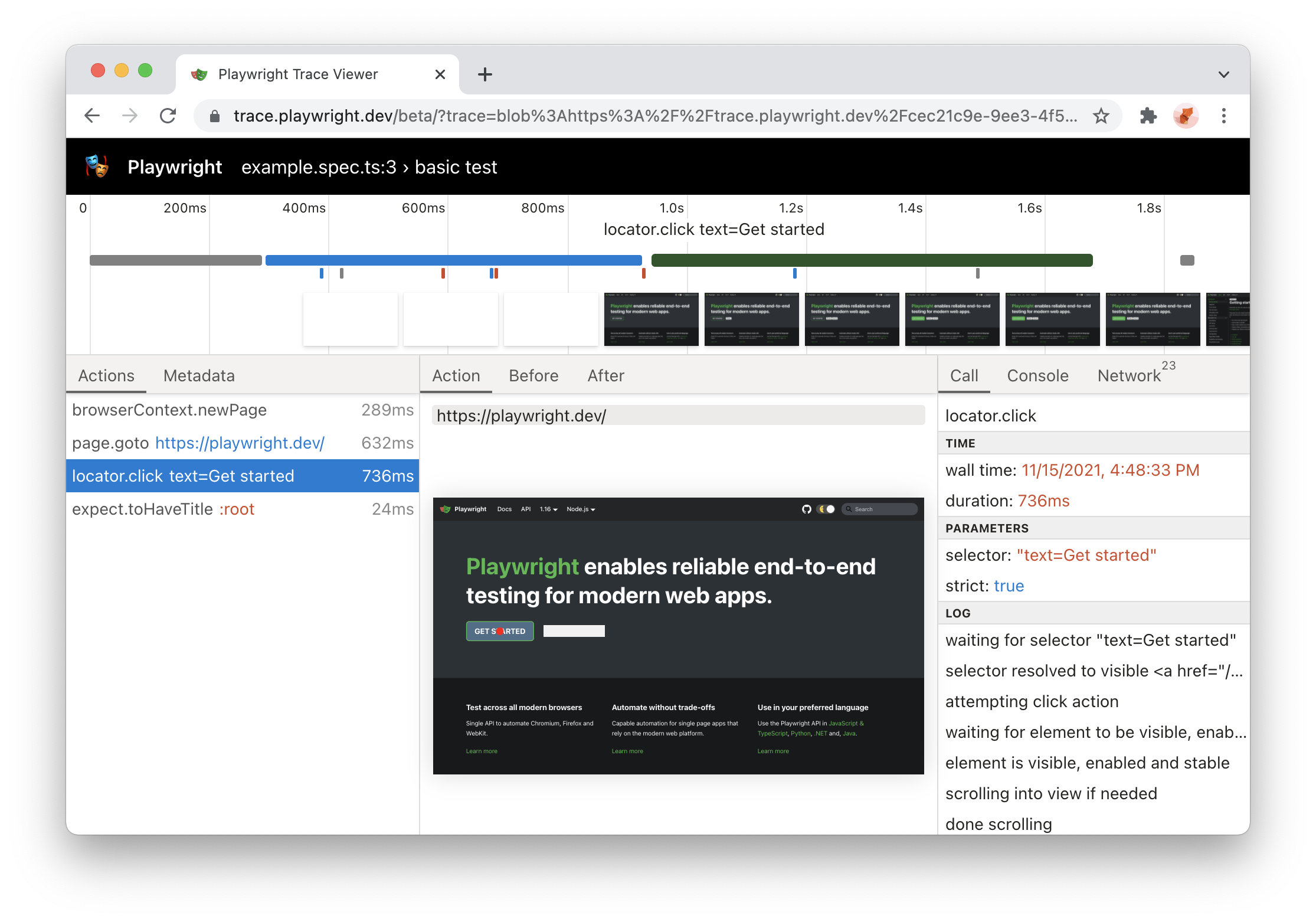
Playwright Trace Viewer is now available online at https://trace.playwright.dev! Just drag-and-drop your trace.zip file to inspect its contents.
NOTE: trace files are not uploaded anywhere; trace.playwright.dev is a progressive web application that processes traces locally.

Playwright now supports Ubuntu 20.04 ARM64. You can now run Playwright tests inside Docker on Apple M1 and on Raspberry Pi.
You can now use Playwright to install stable version of Edge on Linux:
pwsh bin/Debug/netX/playwright.ps1 install msedgeWait for a locator to resolve to a single element with a given state. Defaults to the state: 'visible'.
var orderSent = page.Locator("#order-sent");
orderSent.WaitForAsync();
Read more about Locator.WaitForAsync().
pwsh bin/Debug/netX/playwright.ps1 show-trace and drop trace files to the trace viewer PWARead more about Trace Viewer.
This version of Playwright was also tested against the following stable channels:
By using Mouse.WheelAsync() you are now able to scroll vertically or horizontally.
Previously it was not possible to get multiple header values of a response. This is now possible and additional helper functions are available:
Request.AllHeadersAsync()Request.HeadersArrayAsync()Request.HeaderValueAsync()Response.AllHeadersAsync()Response.HeadersArrayAsync()Response.HeaderValueAsync()Response.HeaderValuesAsync()Its now possible to emulate the forced-colors CSS media feature by passing it in the Browser.NewContextAsync() or calling Page.EmulateMediaAsync().
Page.RouteAsync() accepts new times option to specify how many times this route should be matched.Page.SetCheckedAsync() and Locator.SetCheckedAsync() were introduced to set the checked state of a checkbox.Request.SizesAsync() Returns resource size information for given http request.Tracing.StartChunkAsync() - Start a new trace chunk.Tracing.StopChunkAsync() - Stops a new trace chunk.Selector ambiguity is a common problem in automation testing. "strict" mode ensures that your selector points to a single element and throws otherwise.
Set setStrict(true) in your action calls to opt in.
// This will throw if you have more than one button!
await page.Locator("button", new() { Strict = true });Locator represents a view to the element(s) on the page. It captures the logic sufficient to retrieve the element at any given moment.
The difference between the Locator and ElementHandle is that the latter points to a particular element, while Locator captures the logic of how to retrieve that element.
Also, locators are "strict" by default!
var locator = page.Locator("button");
await locator.ClickAsync();
Learn more in the documentation.
React and Vue selectors allow selecting elements by its component name and/or property values. The syntax is very similar to attribute selectors and supports all attribute selector operators.
await page.Locator("_react=SubmitButton[enabled=true]").ClickAsync();
await page.Locator("_vue=submit-button[enabled=true]").ClickAsync();
Learn more in the react selectors documentation and the vue selectors documentation.
nth and visible selector engines nth selector engine is equivalent to the :nth-match pseudo class, but could be combined with other selector engines.visible selector engine is equivalent to the :visible pseudo class, but could be combined with other selector engines.// select the first button among all buttons
await button.ClickAsync("button >> nth=0");
// or if you are using locators, you can use First, Nth() and Last
await page.Locator("button").First.ClickAsync();
// click a visible button
await button.ClickAsync("button >> visible=true");Page.DragAndDropAsync() API.recordHar option in Browser.NewContextAsync().console.log() calls.baseURL option in Browser.NewContextAsync() and Browser.NewPageAsync()Response.SecurityDetailsAsync() and Response.ServerAddrAsync()Page.DragAndDropAsync() and Frame.DragAndDropAsync()Download.CancelAsync()Page.InputValueAsync(), Frame.InputValueAsync() and ElementHandle.InputValueAsync()force option in Page.FillAsync(), Frame.FillAsync(), and ElementHandle.FillAsync()force option in Page.SelectOptionAsync(), Frame.SelectOptionAsync(), and ElementHandle.SelectOptionAsync()This version of Playwright was also tested against the following stable channels: